AfterDawn Forums
These messages are comments to this news item:

Jailbreak iOS 6.x with evasi0n - supports iPhone, iPod touch, iPad and iPad Mini

news article released on: 4 February, 2013

Team evad3rs bring untethered jailbreak for iOS 6.0 through 6.1. The evasi0n tool was released today, with support for iPhone, iPod touch, iPad and iPad mini devices running iOS 6.x. It is available for Windows, Mac OS X and Linux, and takes only a few minutes to complete. You require...5 minutes of your time!A computer, running Windows (XP minimum), Mac OS X (10.5 minimum) or Linux ...

Read full article
#1 04 Feb 2013 @ 14:34
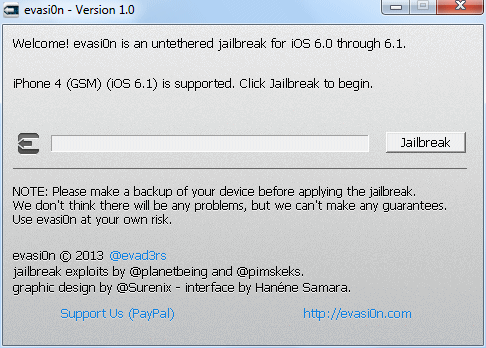
I have been trying to unlock my iPhone 5 for an hour or so... Tried downloading from various sites as well. The issue seems to be the program not recognizing my device (I'm guessing). The "jailbreak" button never lights up to become a clickable button, no matter what I've tried thus far. Not sure what to do to make it work at this point. Simple program that only needs one button to run, yet that button cannot be clicked on my end.
AfterDawn Advertisement
#2 04 Feb 2013 @ 14:40
Originally posted by Flasht2:
I have been trying to unlock my iPhone 5 for an hour or so... Tried downloading from various sites as well. The issue seems to be the program not recognizing my device (I'm guessing). The "jailbreak" button never lights up to become a clickable button, no matter what I've tried thus far. Not sure what to do to make it work at this point. Simple program that only needs one button to run, yet that button cannot be clicked on my end.
Ouch, didn't get that problem myself, what OS are you on? Obviously try the usual suspects (different USB ports, run the app as administrator, etc.)
#3 04 Feb 2013 @ 14:56
Mefickow Unverified new user
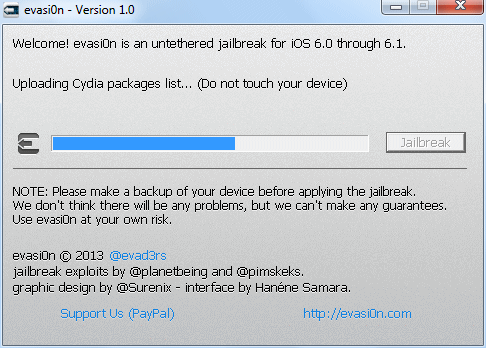
Well, I'm currently trying to jailbreak my iPod Touch 5G. The process continues till 'Injecting Stage 2 jaikbreak data (step 1/3)... (Do not touch your device) and gets stuck there. Any suggestions?

I tried running it as an 'Administrator' but still the same thing. I'm on OS 6.1, by the way.
#4 04 Feb 2013 @ 15:04
Originally posted by Mefickow:
Well, I'm currently trying to jailbreak my iPod Touch 5G. The process continues till 'Injecting Stage 2 jaikbreak data (step 1/3)... (Do not touch your device) and gets stuck there. Any suggestions?

I tried running it as an 'Administrator' but still the same thing. I'm on OS 6.1, by the way.
Unfortunately no, the only thing I had the chance to test it on was my iPhone 4, though I did actually "restore" the iPhone 4 right before I carried out the jailbreak, not sure what difference that would make if any.

I guess the best place to ask about problems during it is at http://www.jailbreakqa.com/ as thats where evad3rs are suggesting people go on the site.
#5 04 Feb 2013 @ 15:11
I just installed it on my iTouch 5G, evertyhing went right so far but, I tried to download some app since PIratebay for example, and then I tried to synchronyze them on my iTouch via iTunes (a friend told me to do so), but it's written "Echec de l'installation..." which means failed to install the app.

What am I doing wrong?
#6 04 Feb 2013 @ 15:25
smarccsc Unverified new user
CAn anyone tell me does it preserve baseband?
I am currently on iOS 5.1.1 and so

1. Should i tether iOS 6.1 using sn0wbreeze first?
2. i have iPhone4 baseband 4.10.01 . I am using gevey i dont want to brick my carrier unlock by updating baseband
#7 04 Feb 2013 @ 15:29
gmanggg Unverified new user
been trying to write my own code to help out the dev team to no avail, but im glad someone finally got it! beautiful interface, and very smooth activation! Bravo!
#8 04 Feb 2013 @ 18:17
Marwamabrouk Unverified new user
How to download jailbreak to ipad3 and iphone4
#9 04 Feb 2013 @ 19:04
amr1 Unverified new user
Can jailbreak unlock my Sprint iPhone 5 ?
#10 04 Feb 2013 @ 20:07
jolisaJ Unverified new user
I just recently jailbroke my IPhone 5 but when I downloads apps in cydia I keep getting some kind of error code. 504 & 5050 I believe. Any help.?
#12 04 Feb 2013 @ 22:50
I figured out the hang on Stage 2. In my case I reset the iPad, and I didnt go through the first time setup. After I had done so AND I launched evasi0n from the hard disk (not from the dmg) I was able to get it to work.
#13 04 Feb 2013 @ 23:22
Clove22 Unverified new user
Jailbroke my 5 6.1 and downloaded Cydia. When it rebooted it stayed on the apple icon and has been that way ever sense. HELP!!
#14 05 Feb 2013 @ 1:20
manual21 Unverified new user
Originally posted by sharkbait:
I figured out the hang on Stage 2. In my case I reset the iPad, and I didnt go through the first time setup. After I had done so AND I launched evasi0n from the hard disk (not from the dmg) I was able to get it to work.
Can you explain further, in detail, exactly what steps you took? What do you mean by 'i didn;t go through the first time set up'? I'm also hanging at 'injecting stage two'
#15 05 Feb 2013 @ 1:58
Originally posted by manual21:
Originally posted by sharkbait:
I figured out the hang on Stage 2. In my case I reset the iPad, and I didnt go through the first time setup. After I had done so AND I launched evasi0n from the hard disk (not from the dmg) I was able to get it to work.
Can you explain further, in detail, exactly what steps you took? What do you mean by 'i didn;t go through the first time set up'? I'm also hanging at 'injecting stage two'
I assume that like me, you probably have backed up your device and reset it. I did so, and that leaves the unit in the factory condition, which means that you are prompted for the WiFi connection, location services, iTunes account etc. before the home screen is displayed. This is what I meant by first time setup.

Despite what I read in CultOfMac, the only way I got the jailbreak properly installed is to back up the device, update to iOS 6.1 first, let iTunes restore your device, then install jailbreak. YMMV.
#16 05 Feb 2013 @ 9:37
Gigi123456 Unverified new user
ISSUE AFTER JAILBREAK, after installing winterboar my iphone rebooted but got stuck on the apple logo. I was able to find how to turn it on again I guess in DFU mode or something like that (i'm new at this..) you know holding the power and home button and then releasing the power and continue holding the home one.. that's the only way to turn it on. Anyone else having the same issue??
#17 05 Feb 2013 @ 10:28
riaanjvr Unverified new user
I did the process fairly quickly and successfully on an iphone 4 and an iphone 4S both running latest IOS6.1 which I installed wrom ipsw file with itunes. Tried the same thing on ipad-2 with IOS 6.2 but it gets stuck in "injecting stage 2 jailbreak data (step 1/3)
I have tried about 10 times now, even re-loaded IOS6.1 nothing wants to get the ipad-2 past this step.
HEEEEEELP anyone?
#18 05 Feb 2013 @ 14:40
otime Unverified new user
Originally posted by Flasht2:
I have been trying to unlock my iPhone 5 for an hour or so... Tried downloading from various sites as well. The issue seems to be the program not recognizing my device (I'm guessing). The "jailbreak" button never lights up to become a clickable button, no matter what I've tried thus far. Not sure what to do to make it work at this point. Simple program that only needs one button to run, yet that button cannot be clicked on my end.
Same problem here, however i am trying at my work pc with no itunes, will try again soon with itunes installed
#19 05 Feb 2013 @ 14:40
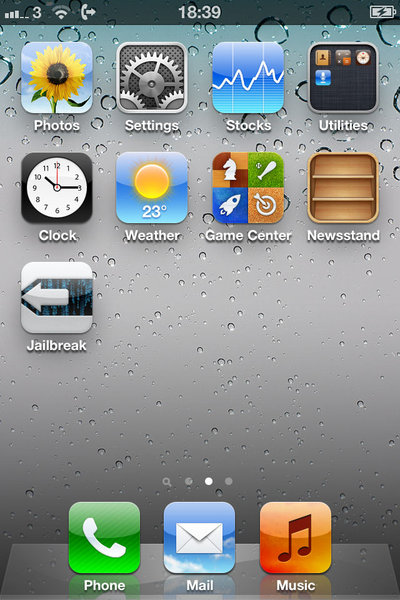
Tried this on my IPod Touch (6.0.1), everything went smooth until I rebooted and found that I only had 4 apps on it. Even the "settings" app was missing. What went wrong?
#20 05 Feb 2013 @ 15:23
Mee3 Unverified new user
I have jailbroken a iPhone 4s, iPhone 5, and a ipad 2 with no trouble. Maybe I'm lucky I guess.
#21 05 Feb 2013 @ 16:39
time2 Unverified new user
Originally posted by otime:
Originally posted by Flasht2:
I have been trying to unlock my iPhone 5 for an hour or so... Tried downloading from various sites as well. The issue seems to be the program not recognizing my device (I'm guessing). The "jailbreak" button never lights up to become a clickable button, no matter what I've tried thus far. Not sure what to do to make it work at this point. Simple program that only needs one button to run, yet that button cannot be clicked on my end.
Same problem here, however i am trying at my work pc with no itunes, will try again soon with itunes installed
The no button never ligths up, was solved in my case by installing itunes..
#22 05 Feb 2013 @ 17:11
When did this site become support for evasi0n????

“Breathe in. Breathe out. Breathe in. Breathe out. Forget this... and attaining enlightenment is the least of your problems.”
–Zen Judaism by Someone Clever
#23 05 Feb 2013 @ 22:07
diginorm Unverified new user
I had no problems on iphone 5 but ipad 2 hung on the injecting stage two. i had just done a shift+restore to 6.1 and then gone straight to the jb tool. after a few more failed attempts i went through the set up stages of newly restored ipad, ie: pushed next on wifi, enabled location, agreed to end user agreement, then i rebooted the ipad, reopened evasi0n, and it worked like a charm. the evad3rs made the smoothest jb i have experienced yet, once i figured out that simple step.
#24 05 Feb 2013 @ 23:30
alantoo Unverified new user
Had the same problem here, hanging at stage 2 and it was because after I did the restore I didn't go through the initial setup process on the iPad (choose wifi, accept terms, etc etc...).

All is good and working now!
#25 06 Feb 2013 @ 11:59
Originally posted by Gigi123456:
ISSUE AFTER JAILBREAK, after installing winterboar my iphone rebooted but got stuck on the apple logo. I was able to find how to turn it on again I guess in DFU mode or something like that (i'm new at this..) you know holding the power and home button and then releasing the power and continue holding the home one.. that's the only way to turn it on. Anyone else having the same issue??
im having the exact same issue right now and im pissed. i really need to know how to get my device back up and running.

If you do not have an AfterDawn.com accout yet, please enter a nickname and your email address below.

We will send an account activation link to the email address you provide, so please make sure to use a valid address. Content will be published on site after you have activated your account.

If you already have an AfterDawn.com account, please login using the next tab.

Login by using your AfterDawn username or your email address.

Reply to this discussion thread


Subscribe to AfterDawn's weekly newsletter.